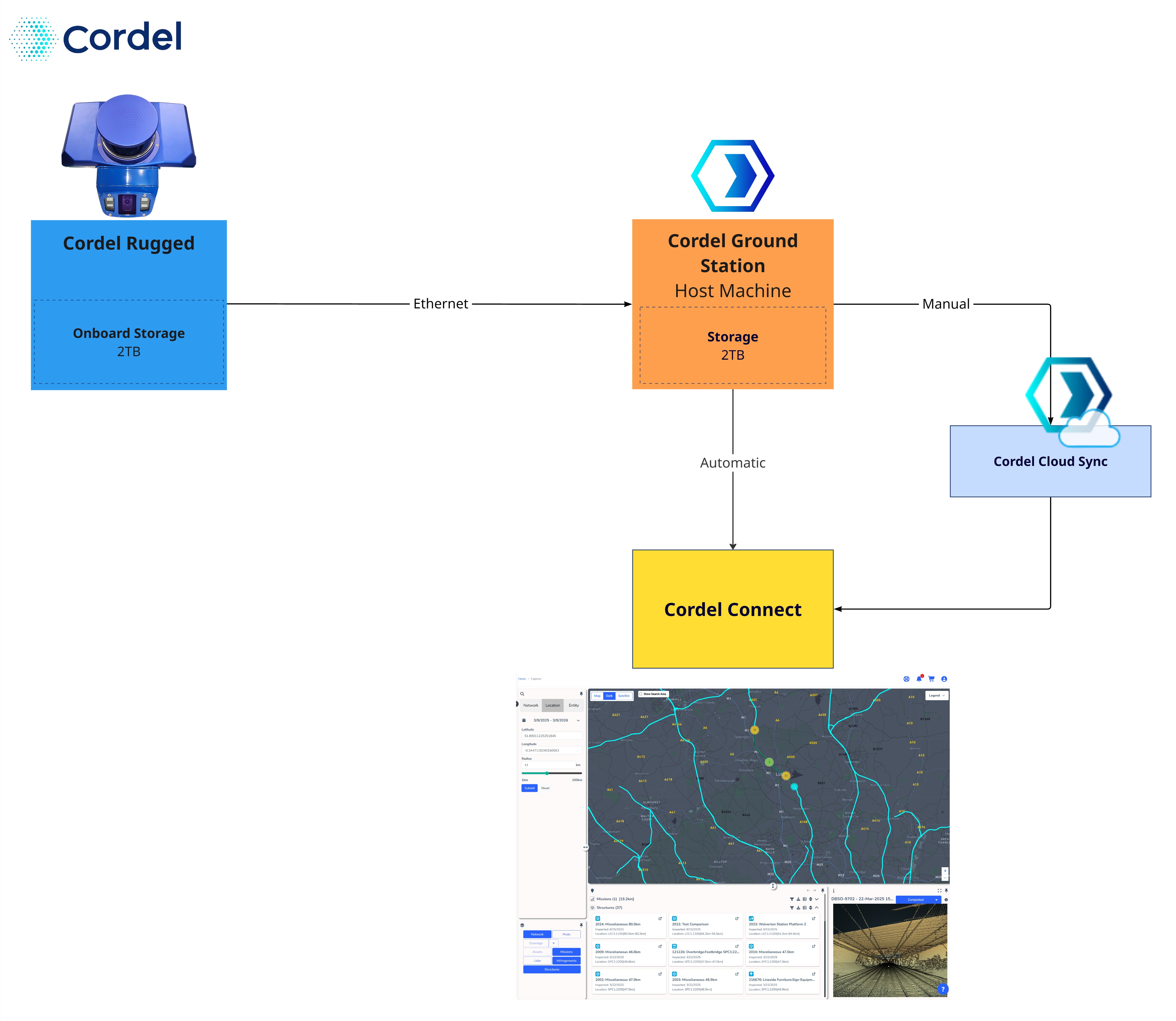
Data collected on the host machine running Cordel Ground Station can be transferred to the Cordel Connect platform either automatically or manually. This guide assumes all data resides on the host machine. For information on how data transfers from Cordel capture hardware to the host machine, refer to How Transfer Data From Cordel Capture Hardware To Ground Station.
Data Storage
Cordel captured data is stored by default in:
C:\Users\<username>\AppData\Local\Cordel
This location may vary depending on your installation. If you cannot locate the data storage folder, please contact Cordel support.
Ground Station manages storage on a FIFO (First In, First Out) basis. When a storage device reaches capacity, the oldest captured data is deleted first to make room for newer capture data.
The total storage required depends on the volume of data captured, capture frequency, and the transfer speed between the capture device and host machine.
Recommendation: Minimum 2TB of storage on the host machine
Manual Upload
Data can be manually retrieved from the host machine using a removable drive and subsequently uploaded to Cordel Connect using the Cordel Cloud Sync application. For information on how to execute this process, visit How To Transfer Data Using Cloud Sync.
Automatic Upload
Cordel Ground Station can be configured to automatically upload data to your Cordel Connect site. This feature must be enabled/disabled via a Cordel Technician. Please contact your account manager to enable this feature.
Once enabled, Ground Station will continuously scan the host machine for captured data and upload it to the Cordel Connect platform.
Automatic upload requires the host machine to have power and a reliable internet connection.
Recommendations:
-
Upload speed: An average upload speed of 20 Mb/s or greater is recommended for near real-time automatic upload. This requirement may vary depending on hardware setup and sensor configuration (how many sensors for you particular installation).
-
Slower connections: If upload speeds fall below this threshold, ensure the host machine remains powered on for longer than the active capture period to allow the upload cache to clear. This can be achieved by leaving the system running after a capture session ends. For installations where the host machine is vehicle-powered, connecting it to a battery UPS (uninterruptible power supply) is recommended to extend uptime after the vehicle's primary power is switched off.