

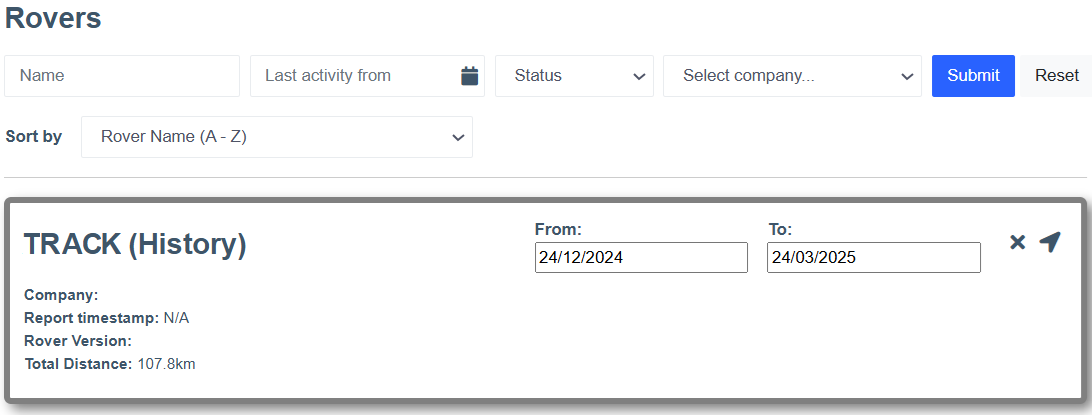
This release delivers new functionality to the Rover history page, specifically the ability for users to view the total distance a Rover has traveled within certain parameters.
The team have made changes to the back end to improve the user experience as well as bug fixes that improve our products.
Core Product Updates
⭐ Feature Highlight: Total Distance View: Rover ⭐
Cordel connect
-
When using the historical Rover view, the total distance in the selected date range will be displayed.
-
Enhanced user experience on the Explorer map, allowing users to maintain geospatial context when making selections.
-
LiDAR Viewer better able to open and render COPC LAZ files.
-
Users can now be deactivated, and reactivated again; instead of deleted.
-
API Key Expiry changes in User Management
-
A new User permission has been added which allows the user to set an Expiry Date for their API key.
-
When an account has this permission, they are able to select an expiry date for new API keys from 1 year, 2 years, 3 years, 5 years or indefinite (never expires).
-
When an account does NOT have this permission, they will receive the default (1 year) expiry when issuing an API key.
-
EQUIPMENT
-
The Rover icons now show in blue when the status is "Ready To Capture" consistently across all sensors/components.
🐞 Fixes 🐞
-
View Survey page - the Survey Assignee modal has been updated so that the messaging and options consider user permissions.
-
Map - the Network Model will now reliably be displayed when the 'Show LRS' checkbox is checked.
-
All new users will receive the correct roles when they are invited to the platform and additional validation checks have been added to ensure users are not created without a role again in the future.